

Ajoute des analyses à ton app depuis Cursor ou Claude en 30 secondes
Sans cookie, conforme au RGPD, pas besoin de bandeau cookie. Ton agent IA sélectionne le bon extrait d'installation pour ton framework (Next.js, Remix, SvelteKit, Nuxt, Astro, Vite, React, HTML simple), modifie le fichier et s'assure que le suivi fonctionne — une invite, un clic OAuth, et c'est bon.
Gratuit à vie — accès complet à MCP. OAuth ou clé API. Pas de carte. Inscrit dans le registre officiel de MCP.
🚀 Installe & configure
📊 Découvre & analyse
Un vrai tableau de bord, pas un bot de discussion
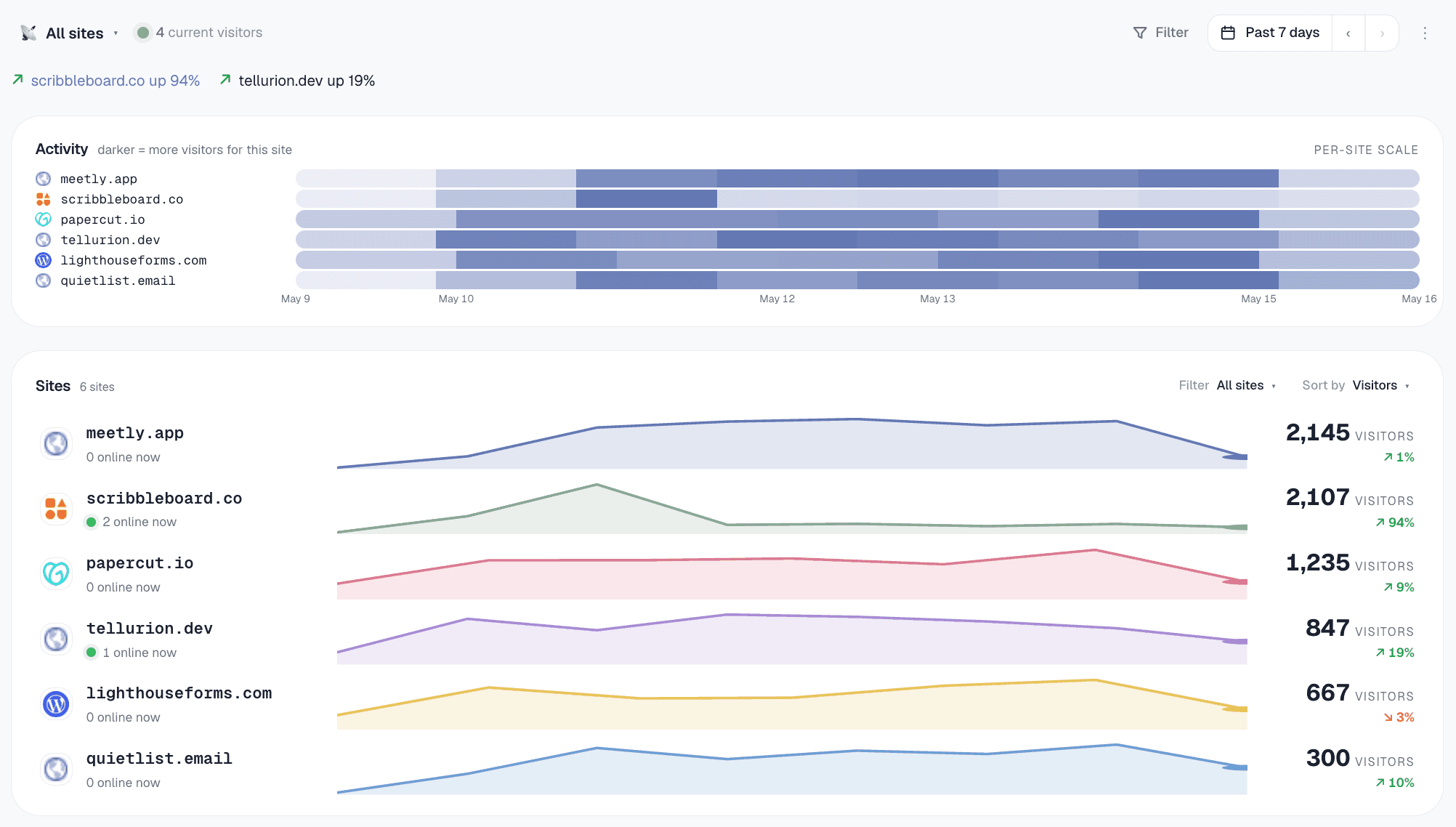
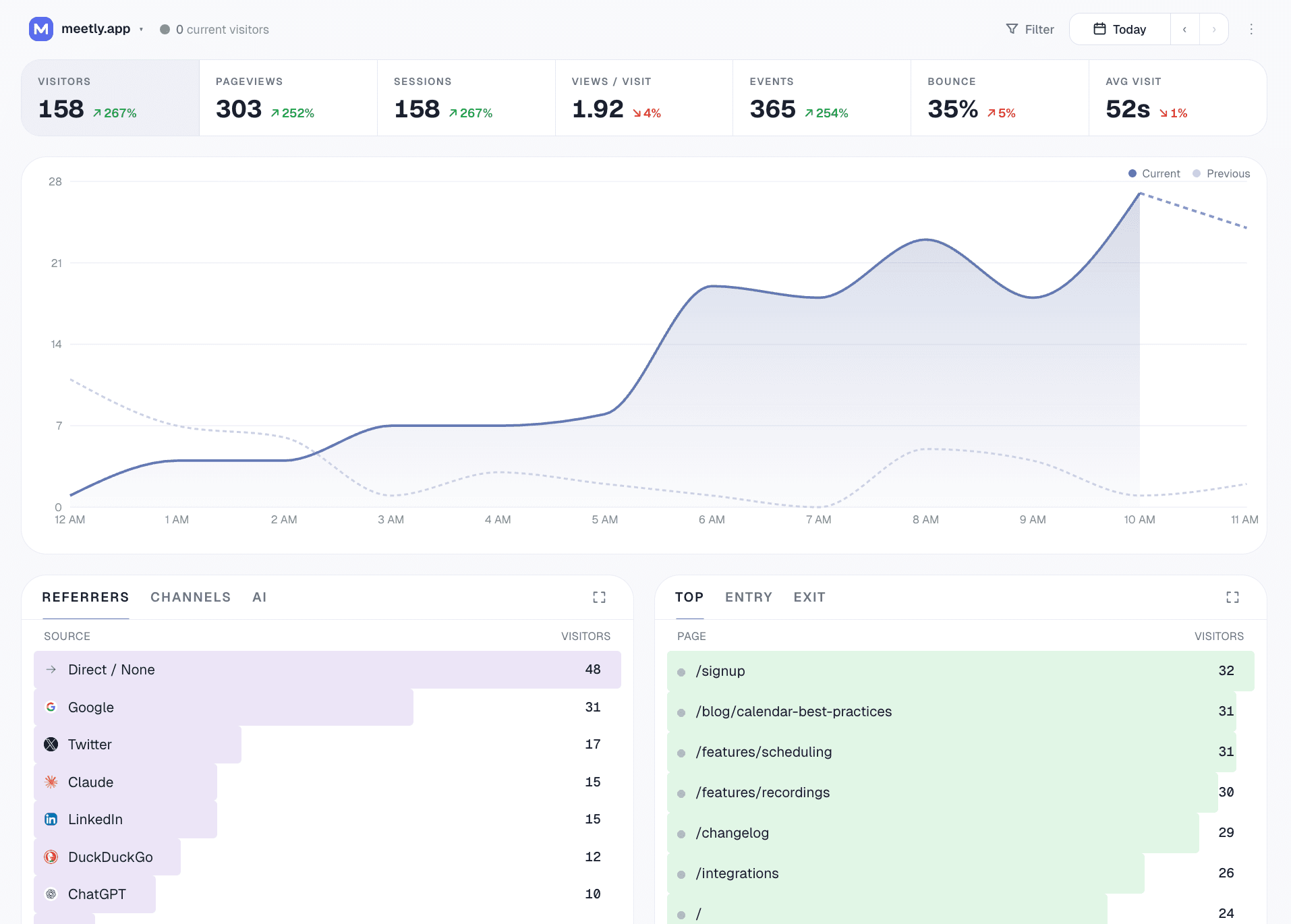
Gizmo est équipé d'un tableau de bord complet pour les opérateurs — l'agent IA est une autre manière d'accéder aux mêmes données. Vue d'ensemble de la flotte sur tous les sites, puis plonge dans l'un d'eux pour des filtres, des analyses et des objectifs de conversion.
C'est quoi l'analyse MCP ?
MCP signifie Modèle de Contexte Protocole — un standard ouvert, lancé par Anthropic, qui permet aux assistants IA de se connecter à des outils et des données externes sans avoir à intégrer du code pour chaque outil. Un serveur MCP expose un ensemble d'outils nommés (chacun avec un schéma typé) que tout client compatible avec MCP peut découvrir et utiliser.
analytique MCP c'est une plateforme d'analytics qui vient avec un serveur MCP. Ton agent AI se connecte une fois — généralement avec un simple copier-coller de config — et ensuite, il peut utiliser n'importe quel outil de la plateforme de manière native. Ajoute un site, interroge le trafic, tague un domaine, fais une répartition — tout ça juste en demandant.
Gizmo est conçu en priorité pour MCP. Chaque action dans notre tableau de bord est aussi un outil MCP. Ce n'est pas juste un point sur la feuille de route ; c'est l'architecture. Le tableau de bord est une interface pour les données, et votre agent IA en est une autre. Les deux passent par les mêmes fonctions de gestion, les mêmes limites de taux, et le même modèle d'autorisation.
Pourquoi l'analyse MCP est essentielle pour les indépendants
Zéro code superflu
La plupart des outils d'analyse proposent une API HTTP. Brancher ça à Claude ou Cursor, c'est se retrouver à écrire un wrapper, à concevoir des schémas d'outils, et à gérer l'authentification, les erreurs et les limites de taux. Avec l'analyse MCP, le client AI communique directement avec le protocole. Un simple copier-coller de configuration et c'est dans la poche.
Lire ET rédiger
L'analytics MCP, ce n'est pas seulement papoter avec vos données. Votre agent peut aussi créer des sites, gérer des balises, installer le suivi sur de nouveaux domaines et mettre à jour l'état de l'espace de travail. Le tableau de bord devient un outil secondaire, pas l'interface principale.
Opérations de flotte à la vitesse d'un pro
"Tague chaque site avec moins de 100 visites le mois dernier comme 'mort.'" C'est des minutes à cliquer sur chaque site et à le taguer, ou une simple phrase avec les analyses MCP. Pour les opérateurs de flotte qui gèrent 10 à 50+ sites, c'est un temps précieux économisé.
Conçu pour s'adapter à ton espace de travail
Chaque clé MCP est associée à un seul espace de travail. Ton agent IA ne peut pas s'échapper vers d'autres espaces, modifier la facturation ou obtenir plus d'accès. Limité par taux par espace de travail pour que les agents indésirables ne puissent pas épuiser ton quota.
Les 36 outils d'analyse MCP que ton agent peut utiliser
Trois catégories : workflows (réponses de type "pourquoi le trafic a-t-il changé" en mode simplifié), configuration (installer + configurer) et primitives de requête (lectures filtrables). Tout est disponible sur tous les plans, y compris le plan Gratuit.
summarize_all_sites— état de la flotte + attention requiserank_sites_by_growth— plus gros changementsidentify_dead_sites— jamais installé + silencieuxdetect_anomalies— jours de trafic atypiquesexplain_traffic_change— "pourquoi X s'est-il passé ?"get_realtime— visiteurs actifs et dernières pages sur cinq minutesget_conversion_report— taux de conversion, abandons et lacunes de mesure
Compositions au-dessus des primitives — l'agent reçoit une structure de niveau analyste, pas des chiffres bruts à enchaîner.
create_site+get_install_snippetget_event_tracking_snippet— événements sur mesureget_badge_snippet— "Propulsé par" footercreate_goal/list/deletecreate_funnel/list/deleteadd_site_tags+filter_sites_by_taglist_sites
Limites flexibles — elles sont élevées pendant la configuration, quasiment nulles après.
get_workspace_overviewget_site_trafficget_top_pages/get_top_referrersget_breakdown— pays / navigateur / appareil / canal / source d'IA / ville / etc.get_time_seriesquery_eventsbreakdown_by_property— propriétés d'événements sur mesure
Chaque primitive gère des filtres empilés (pays=US ET appareil=mobile…) et des plages de dates sur mesure. Plafonds quotidiens selon le niveau : 50/jour Gratuit → 3000/jour Échelle.
Des trucs concrets que tu peux demander à MCP analytics de faire
Comment mettre en place les analyses MCP en 3 minutes
- 1Inscris-toi gratuitementCommence gratuitement — Connexion Google ou lien magique. Ton espace de travail est créé automatiquement.
- 2Ajoute le serveur Gizmo MCP dans ton IDEDans les réglages MCP de Cursor / Claude / Windsurf, ajoute un serveur avec l'URL
https://gizmoanalytics.io/mcp. L'IDE détecte automatiquement le serveur d'auth et ouvre un nouvel onglet dans ton navigateur. - 3Validez l'écran de consentementLe navigateur affiche notre écran de consentement. Tu vois ce que l'IDE demande (accéder à tes analytics, configurer des sites). Clique sur Autoriser. L'onglet du navigateur se ferme tout seul.
- 4Teste-leOuvre une discussion avec ton assistant IA et dis "ajoute des analyses à cette app." L'agent détecte ton framework, choisit le bon extrait, ajuste ton fichier de mise en page et te propose de vérifier l'installation une fois que tu déploies. Un prompt, configuration complète.
- 5Gérer ou annulerChaque application connectée s'affiche à /dashboard/connect/oauth. Un clic pour se déconnecter.
MCP analytics — questions fréquentes
L'analyse MCP, c'est une analyse web qui dévoile ses données et ses opérations grâce au Protocole de Contexte de Modèle (MCP). MCP est un protocole ouvert d'Anthropic qui permet aux assistants IA comme Claude, Cursor et Codex de se connecter directement à des outils externes — sans que tu aies besoin d'écrire un wrapper HTTP sur mesure, de gérer l'authentification ou de concevoir le schéma de prompt. Gizmo Analytics est la première plateforme d'analyse conçue en priorité pour MCP : chaque action dans notre tableau de bord correspond aussi à un appel d'outil MCP que ton agent IA peut réaliser.
La plupart des outils d'analyse (GA4, Plausible, Fathom, Mixpanel, Amplitude) disposent d'une API REST. Pour les utiliser avec Claude ou Cursor, tu dois écrire un wrapper, concevoir des schémas d'outils, gérer l'authentification et le maintenir indéfiniment. MCP, c'est la solution qui simplifie tout ça : il te suffit de coller notre URL de point de terminaison MCP dans ton client AI, de cliquer sur Autoriser sur l'écran de consentement qui s'affiche dans ton navigateur, et ensuite, l'IA peut appeler directement n'importe lequel de nos 36 outils d'analyse — y compris des workflows de haut niveau comme 'pourquoi le trafic a-t-il changé' et 'quels sites ont besoin d'attention', qui combinent plusieurs sources de données en un seul appel. Le protocole s'occupe de l'authentification, du schéma et de la découvrabilité pour toi.
Claude Desktop, Claude Code, Cursor, Codex (l'agent de codage d'OpenAI), Windsurf, Cline, Continue, et Zed parlent tous nativement MCP depuis mi-2026, ainsi qu'une liste de clients moins connus qui ne cesse de s'allonger. Chacun d'eux peut se brancher à Gizmo avec un simple collage de config — pas besoin de faire de l'intégration client de ton côté.
36 opérations réparties sur trois catégories. Flux de travail : summarize_all_sites, rank_sites_by_growth, identify_dead_sites, detect_anomalies, explain_traffic_change. Configuration : list_sites, create_site (framework-aware : next/react/vite/remix/astro/nuxt/sveltekit/html), get_install_snippet, verify_install (récupère ta page d'accueil et confirme que le tracker se charge), get_event_tracking_snippet, get_badge_snippet, add_site_tags, filter_sites_by_tag, create_goal/list_goals/delete_goal, create_funnel/list_funnels/delete_funnel. Primitives de requête : get_workspace_overview, get_site_traffic, get_top_pages, get_top_referrers, get_breakdown, get_time_series, query_events, breakdown_by_property — chacune prend en charge des filtres empilés (country=US AND device=mobile AND ...) et des plages de dates personnalisées, donc 'top pages from Germany last quarter' est un appel d'outil.
Chaque connexion est limitée à l'espace de travail — ton agent IA ne peut voir et modifier que les données à l'intérieur de l'espace de travail auquel tu as consenti. Les autorisations OAuth sont également limitées : tu peux accorder analytics:read seulement (l'IA peut lire ton trafic mais ne peut rien créer ou modifier), ou analytics:read + analytics:write (lecture plus opérations de configuration comme l'ajout d'un site). Tu peux voir et révoquer chaque application connectée à /dashboard/connect/oauth — la déconnexion prend effet lors de la prochaine demande. Nous limitons le taux par espace de travail (50 appels de requête/jour sur Free, montant à 3 000/jour sur Scale) donc un agent incontrôlé ne peut pas épuiser ton quota ou notre infra.
Tu peux. La vraie question, c'est qui s'en charge. Chaque intégration API représente une dette de maintenance : dérive de schéma, rafraîchissements d'auth, changements de limites de taux, gestion des erreurs. MCP est la solution au niveau protocolaire — ton client AI implémente MCP une fois, et ensuite, chaque outil natif MCP fonctionne tout seul. Pour un opérateur indépendant qui gère plusieurs sites, le coût d'écriture et de maintenance d'intégrations API sur différents outils est bien réel. L'analytics MCP élimine ce coût pour la couche d'analytics.
Non, mais c'est là que se trouve le vrai levier. Même les utilisateurs occasionnels en profitent : 'ajouter foo.com à mes analytics' avec Claude, c'est bien plus rapide que de se connecter à un tableau de bord et de jongler avec un assistant de configuration. Le levier devient encore plus puissant pour ceux qui gèrent une flotte de 10+ sites ou qui font des rapports quotidiens — avoir Claude qui tire les chiffres de la semaine dernière et rédige un résumé pendant que tu sirotes ton café.
Inscris-toi gratuitement sur gizmoanalytics.io. Dans les paramètres MCP de ton IDE (Cursor, Claude, Windsurf), ajoute un nouveau serveur avec l'URL https://gizmoanalytics.io/mcp. L'IDE ouvre un onglet de navigateur sur notre écran de consentement, tu cliques sur Autoriser, et la connexion est active. Maintenant, demande 'ajouter foo.com à Gizmo' et c'est fait. Le niveau gratuit inclut un accès complet à MCP — 50 appels de requête/jour, appels de configuration illimités. Si ton IDE ne prend pas encore en charge les serveurs MCP basés sur OAuth, /dashboard/connect propose toujours l'installation de l'API clé héritée pour chaque client majeur.
Essaie analytique MCP aujourd'hui
Accès complet à MCP gratuit. 36 outils pour gérer les workflows, la configuration et les requêtes. OAuth ou clé API. Branche-le en 3 minutes.
Continue à lire
- Tableau de bord d'analytics de site webUn tableau de bord pour tous les sites que tu gères.
- Outil d'analytics webCe qu'il faut garder à l'œil en 2026, et comment les options se comparent.
- Google Analytics pour plusieurs sitesSuivre un ensemble de sites sans se perdre dans le labyrinthe des propriétés GA4.
- Analytics pour les agencesTous les sites de tes clients dans un seul espace de travail, des rapports en un clin d'œil.