

Añade analíticas a tu app desde Cursor o Claude en 30 segundos
Sin cookies, amigable con el GDPR, sin necesidad de banner de cookies. Tu agente de IA elige el fragmento de instalación adecuado para tu framework (Next.js, Remix, SvelteKit, Nuxt, Astro, Vite, React, HTML simple), edita el archivo y verifica que esté rastreando — un aviso, un clic de OAuth, ¡listo!
Gratis para siempre — acceso total a MCP. OAuth o clave API. Sin tarjeta. Aparecemos en el Registro oficial de MCP.
🚀 Instala y configura
📊 Lee y analiza
Un panel de verdad, no un chatbot
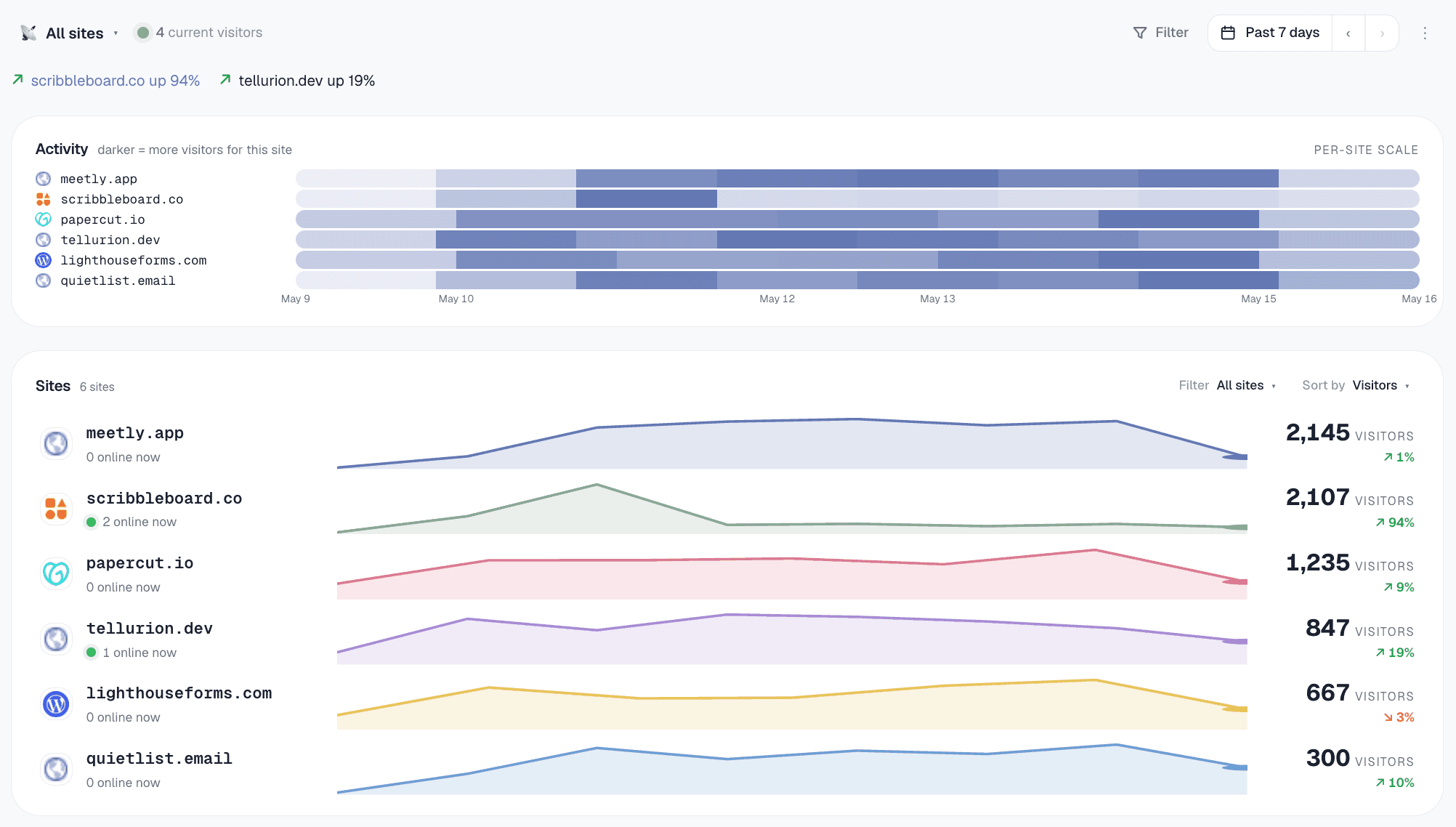
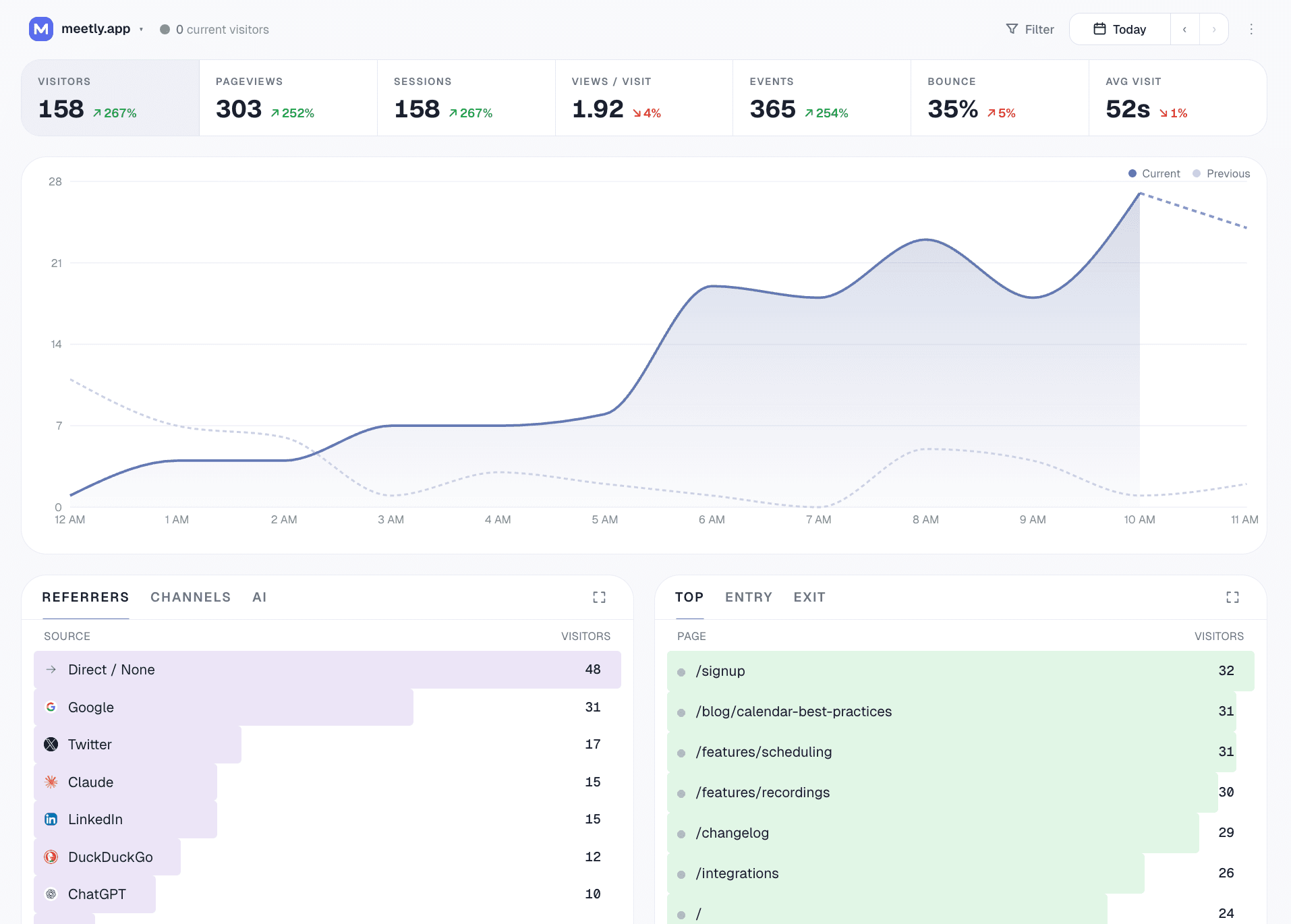
Gizmo trae un panel de control completo — el agente de IA es otra manera de acceder a los mismos datos. Vista de flota en cada sitio y luego puedes profundizar en cualquiera para aplicar filtros, desgloses y objetivos de conversión.
¿Qué es la analítica de MCP?
MCP representa Protocolo de Contexto del Modelo — un estándar abierto, creado por Anthropic, que permite a los asistentes de IA conectarse a herramientas y datos externos sin necesidad de código de integración por cada herramienta. Un servidor MCP expone un conjunto de herramientas nombradas (cada una con un esquema tipado) que cualquier cliente que conozca MCP puede descubrir y utilizar.
analítica MCP es una plataforma de análisis que incluye un servidor MCP. Tu agente de IA se conecta una vez — normalmente solo necesitas pegar la configuración una vez — y a partir de ahí puede acceder a cualquiera de las herramientas de la plataforma de manera nativa. Agrega un sitio, consulta el tráfico, etiqueta un dominio, haz un desglose — todo solo preguntando.
Gizmo está diseñado primero para MCP. Cada acción en nuestro panel es también una herramienta de MCP. No es solo un ítem en la hoja de ruta; es la arquitectura. El panel es una interfaz para los datos; tu agente de IA es otra. Ambos utilizan las mismas funciones de manejo, los mismos límites de tasa y el mismo modelo de autorización.
Por qué la analítica MCP es clave para los operadores indie
Cero código complicado
La mayoría de las herramientas de análisis cuentan con una API HTTP. Conectar eso a Claude o Cursor implica escribir un envoltorio, diseñar esquemas de herramientas, gestionar la autenticación, los estados de error y los límites de tasa. Con el análisis MCP, el cliente de IA se comunica directamente con el protocolo. Solo pega la configuración y ¡listo!
Leer Y escribir
La analítica de MCP no se trata solo de chatear con tus datos. Tu agente también puede crear sitios, gestionar etiquetas, instalar seguimiento en nuevos dominios y actualizar el estado del espacio de trabajo. El panel pasa a ser un respaldo, no la interfaz principal.
Operaciones de flota al ritmo del agente
"Etiqueta cada sitio con menos de 100 visitas el mes pasado como 'muerto'." Eso son minutos de estar haciendo clic en cada sitio y etiquetarlo, o simplemente una frase con el análisis de MCP. Para los operadores de flota que manejan de 10 a más de 50 sitios, esto significa un tiempo real que se ahorra.
Diseñado para tu espacio de trabajo
Cada clave de MCP está asociada a un único espacio de trabajo. Tu agente de IA no puede escaparse a otros espacios, cambiar la facturación ni aumentar el acceso. Limitado por tasa por espacio de trabajo para que los agentes descontrolados no se pasen de tu cuota.
Las 36 herramientas de análisis MCP que puede usar tu agente
Tres categorías: flujos de trabajo (respuestas de alto nivel al estilo "¿por qué cambió el tráfico?"), configuración (instalar + configurar) y consultas primitivas (lecturas filtrables). Todas disponibles en cualquier plan, incluyendo el Gratis.
summarize_all_sites— estado de la flota + atención requeridarank_sites_by_growth— los que más se muevenidentify_dead_sites— nunca instalado + en silenciodetect_anomalies— días de tráfico extrañoexplain_traffic_change— "¿por qué ocurrió X?"get_realtime— visitantes activos y sus últimas páginas en cinco minutosget_conversion_report— tasas de objetivos, abandonos y problemas de medición
Composiciones sobre los primitivos — el agente recibe una estructura de nivel analista, no solo conteos crudos para encadenarse.
create_site+get_install_snippetget_event_tracking_snippet— eventos a tu medidaget_badge_snippet— "Desarrollado por" footercreate_goal/list/deletecreate_funnel/list/deleteadd_site_tags+filter_sites_by_taglist_sites
Límites sueltos — son intermitentes durante la configuración, casi nulos después.
get_workspace_overviewget_site_trafficget_top_pages/get_top_referrersget_breakdown— país / navegador / dispositivo / canal / fuente de IA / ciudad / etc.get_time_seriesquery_eventsbreakdown_by_property— props de evento personalizado
Cada primitivo permite filtros apilados (país=EE. UU. Y dispositivo=móvil…) y rangos de fechas personalizados. Límites diarios según el nivel: 50/día Gratis → 3000/día Escala.
Cosas concretas que le puedes pedir a la analítica de MCP
Cómo poner en marcha la analítica MCP en 3 minutos
- 1Regístrate sin costoEmpieza gratis — Inicia sesión con Google o usa un enlace mágico. Tu espacio de trabajo se crea automáticamente.
- 2Añade el servidor Gizmo MCP a tu IDEEn la configuración de MCP de Cursor / Claude / Windsurf, agrega un servidor con URL
https://gizmoanalytics.io/mcp. El IDE detecta automáticamente el servidor de autenticación y abre una pestaña en el navegador. - 3Aprueba la pantalla de aceptaciónEl navegador abre nuestra pantalla de consentimiento. Ves lo que el IDE necesita (lee tus analytics, configura sitios). Haz clic en Permitir. La pestaña del navegador se cierra sola.
- 4Pruébalo yaAbre un chat con tu asistente de IA y dile "añade analíticas a esta app." El agente detecta tu framework, elige el snippet adecuado, edita tu archivo de diseño y te ofrece verificar la instalación una vez que lo despliegues. Un aviso, configuración completa.
- 5Gestiona o anulaCada app que conectas aparece en /dashboard/connect/oauth. Un clic y desconectas.
MCP analytics — preguntas que más se hacen
La analítica MCP se refiere a la analítica web que expone sus datos y operaciones a través del Protocolo de Contexto del Modelo (MCP). MCP es un protocolo abierto de Anthropic que permite a asistentes de IA como Claude, Cursor y Codex conectarse a herramientas externas de manera nativa — sin que tengas que escribir un envoltorio HTTP personalizado, manejar la autenticación o diseñar el esquema de prompt. Gizmo Analytics es la primera plataforma de analítica construida con un enfoque MCP: cada acción en nuestro panel también es una llamada a la herramienta MCP que tu agente de IA puede realizar.
La mayoría de las herramientas de análisis (GA4, Plausible, Fathom, Mixpanel, Amplitude) tienen una API REST. Para usarlas desde Claude o Cursor, tienes que escribir un wrapper, diseñar esquemas de herramientas, manejar la autenticación y mantenerlo para siempre. MCP es el estándar que elimina todo eso: solo pega nuestra URL de endpoint MCP en tu cliente de IA, haz clic en Permitir en la pantalla de consentimiento que aparece en tu navegador, y a partir de ahí la IA puede llamar a cualquiera de nuestras 36 herramientas de análisis directamente — incluyendo flujos de trabajo de alto nivel como 'por qué cambió el tráfico' y 'qué sitios necesitan atención' que combinan múltiples fuentes de datos en una sola llamada. El protocolo se encarga de la autenticación, el esquema y la descubribilidad por ti.
Claude Desktop, Claude Code, Cursor, Codex (el agente de codificación de OpenAI), Windsurf, Cline, Continuar y Zed hablan MCP de forma nativa desde mediados de 2026, además de una lista en constante crecimiento de clientes menos conocidos. Cualquiera de estos puede conectarse a Gizmo con un simple pegado de configuración — sin necesidad de hacer integración por cliente de tu parte.
36 operaciones en tres categorías. Flujos de trabajo: summarize_all_sites, rank_sites_by_growth, identify_dead_sites, detect_anomalies, explain_traffic_change. Configuración: list_sites, create_site (framework-aware: next/react/vite/remix/astro/nuxt/sveltekit/html), get_install_snippet, verify_install (obtiene tu página de inicio y confirma que el rastreador se está cargando), get_event_tracking_snippet, get_badge_snippet, add_site_tags, filter_sites_by_tag, create_goal/list_goals/delete_goal, create_funnel/list_funnels/delete_funnel. Primitivas de consulta: get_workspace_overview, get_site_traffic, get_top_pages, get_top_referrers, get_breakdown, get_time_series, query_events, breakdown_by_property — cada una admite filtros apilados (country=US AND device=mobile AND ...) y rangos de fechas personalizados, así que 'top pages from Germany last quarter' es una sola llamada de herramienta.
Cada conexión está limitada al espacio de trabajo: tu agente de IA solo puede ver y modificar datos dentro del espacio de trabajo al que diste tu consentimiento. Los permisos de OAuth también tienen sus límites: puedes otorgar solo analytics:read (la IA puede leer tu tráfico pero no crear ni modificar nada), o analytics:read + analytics:write (lectura más operaciones de configuración como agregar un sitio). Puedes ver y revocar cada aplicación conectada en /dashboard/connect/oauth — desconectar tendrá efecto en la próxima solicitud. Limitamos la tasa por espacio de trabajo (50 llamadas de consulta/día en Free, escalando a 3,000/día en Scale) para que un agente descontrolado no consuma tu cuota ni nuestra infraestructura.
Puedes. La pregunta es quién se encarga de mantenerlo. Cada integración de API es una deuda de mantenimiento: desviaciones en el esquema, actualizaciones de autenticación, cambios en los límites de uso, manejo de errores. MCP es la solución a nivel de protocolo para eso — tu cliente AI implementa MCP una vez, y desde entonces, cada herramienta nativa de MCP simplemente funciona. Para un operador indie que gestiona una flota de sitios, el costo de escribir y mantener integraciones de API personalizadas en varias herramientas es real. La analítica de MCP elimina ese costo para la capa de analítica.
No, pero ahí es donde está la ventaja. Incluso los usuarios casuales sacan provecho: 'agregar foo.com a mis análisis' de Claude es más rápido que iniciar sesión en un panel y navegar por un asistente de configuración. La verdadera ventaja se nota para quienes manejan una flota de 10+ sitios o realizan flujos de trabajo de informes diarios — dejando que Claude obtenga los números de la semana pasada y escriba un resumen mientras todavía estás disfrutando tu café.
Regístrate gratis en gizmoanalytics.io. En la configuración de MCP de tu IDE (Cursor, Claude, Windsurf), añade un nuevo servidor con la URL https://gizmoanalytics.io/mcp. El IDE abre una pestaña del navegador a nuestra pantalla de consentimiento, haces clic en Permitir y la conexión se activa. Ahora pregunta 'agregar foo.com a Gizmo' y lo hace. El plan gratuito incluye acceso completo a MCP: 50 llamadas de consulta al día y llamadas de configuración ilimitadas. Si tu IDE aún no soporta servidores MCP basados en OAuth, /dashboard/connect todavía tiene la instalación de API-key heredada para cada cliente importante.
Prueba analítica MCP hoy
Acceso completo a MCP gratis. 36 herramientas en flujos de trabajo, configuración y primitivas de consulta. OAuth o clave API. Conéctalo en 3 minutos.
Sigue con la lectura
- Panel de análisis de sitios webUn solo panel para todos los sitios que manejas.
- Herramienta de análisis de la webQué tener en cuenta en 2026 y cómo se comparan las opciones.
- Google Analytics para varios dominiosRastreando un portafolio de sitios sin complicarte con el laberinto de propiedades de GA4.
- Analítica para agenciasCada sitio de cliente en un solo espacio de trabajo, informes en un solo clic.